Keepworthy
Keepworthy ranks your photos and videos and gets your storage back.
A free photo curator for iPhone and Mac, built by one developer. Everything a writer needs is on this page, with nothing to request by email.
Fact sheet
- App name
- Keepworthy
- One-liner
- Keepworthy ranks your photos and videos and gets your storage back.
- What it is
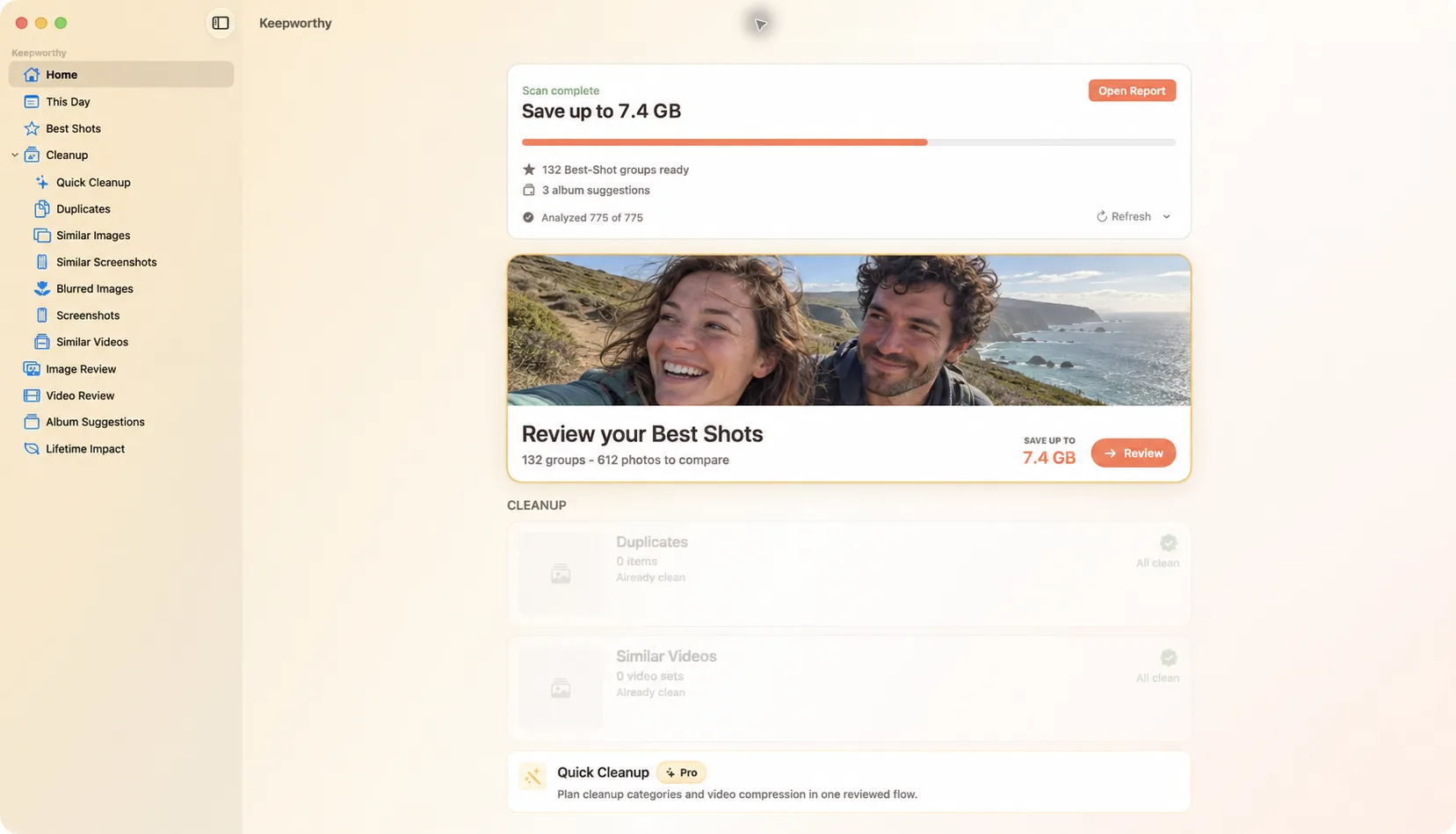
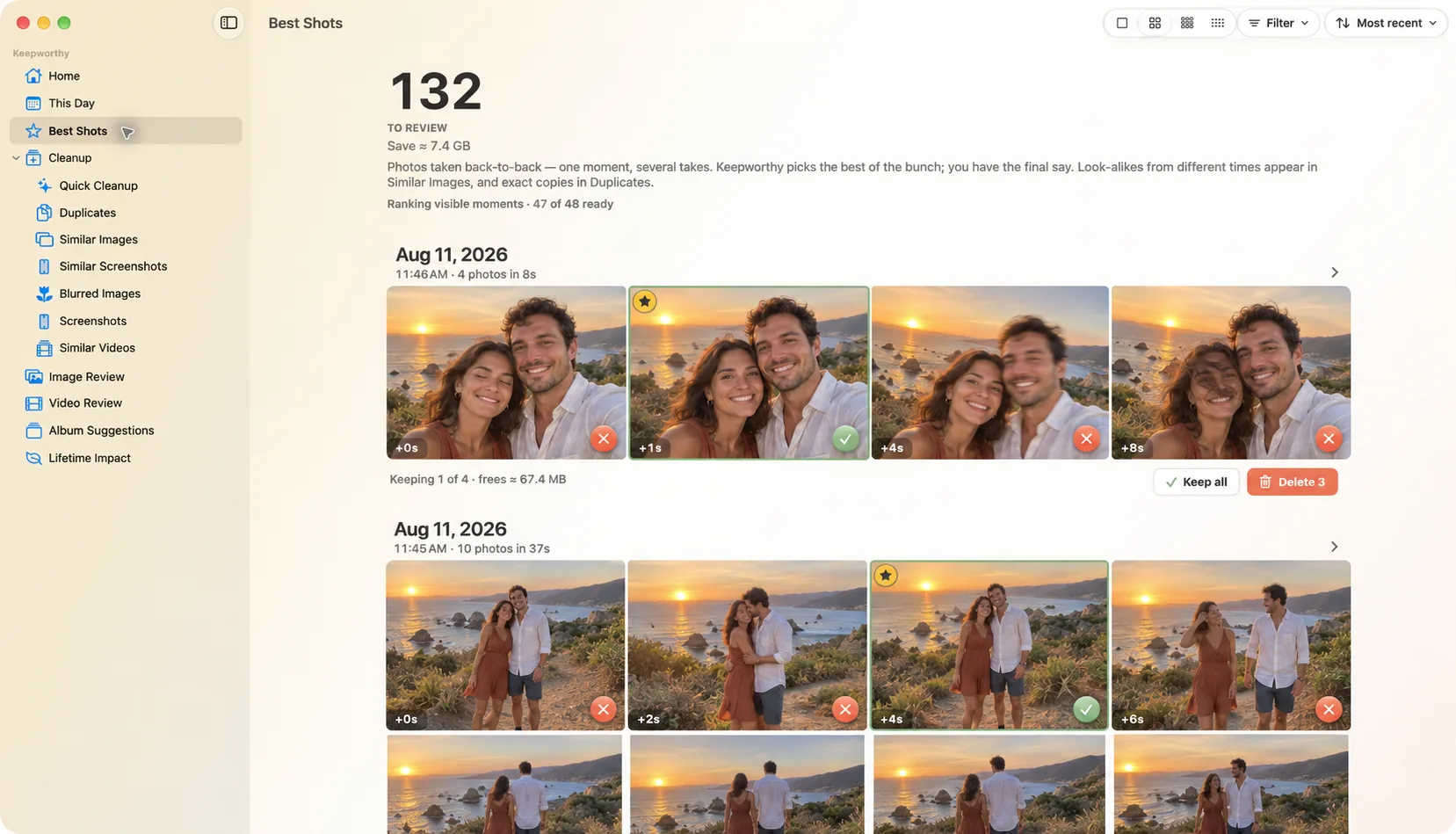
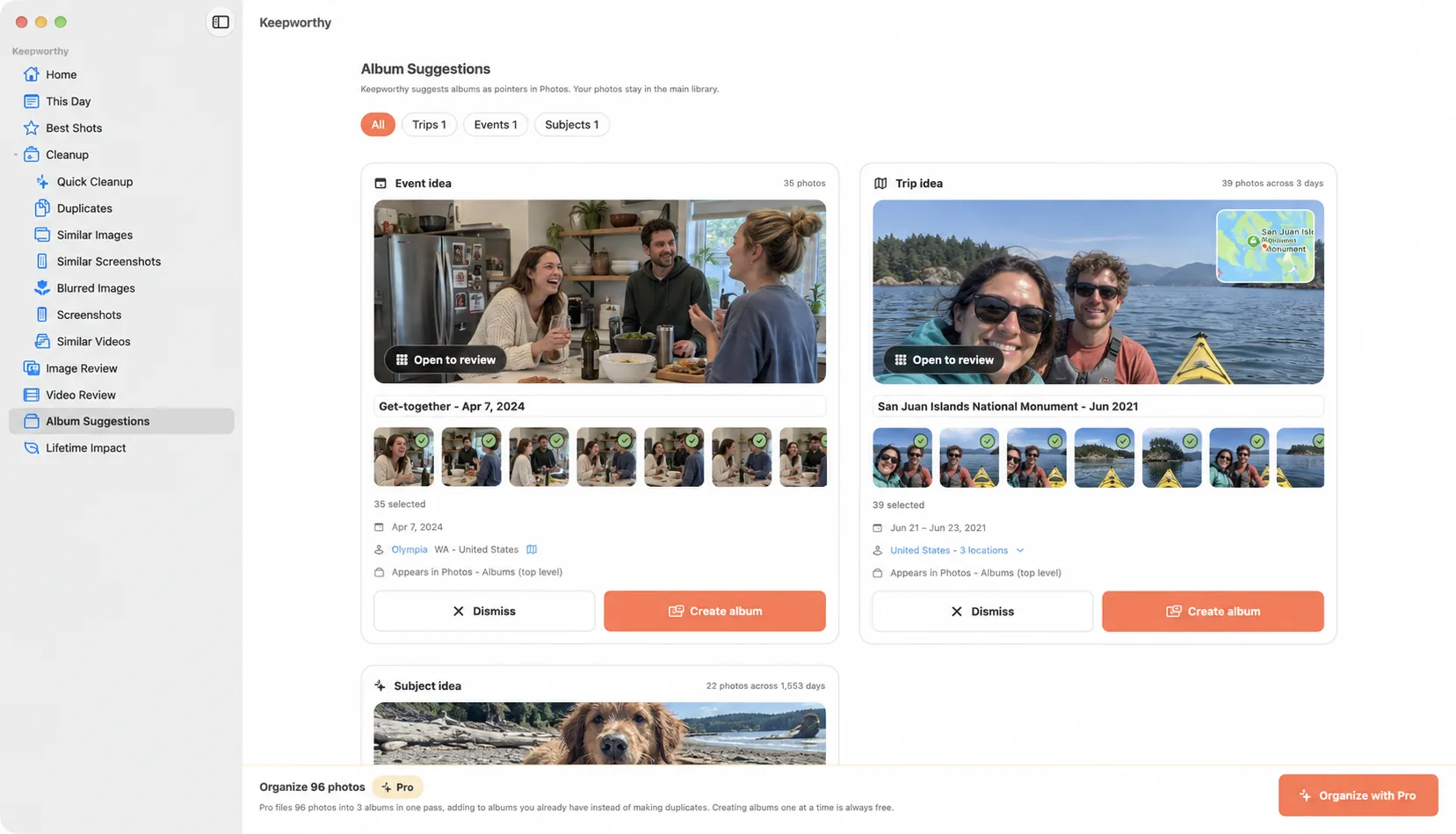
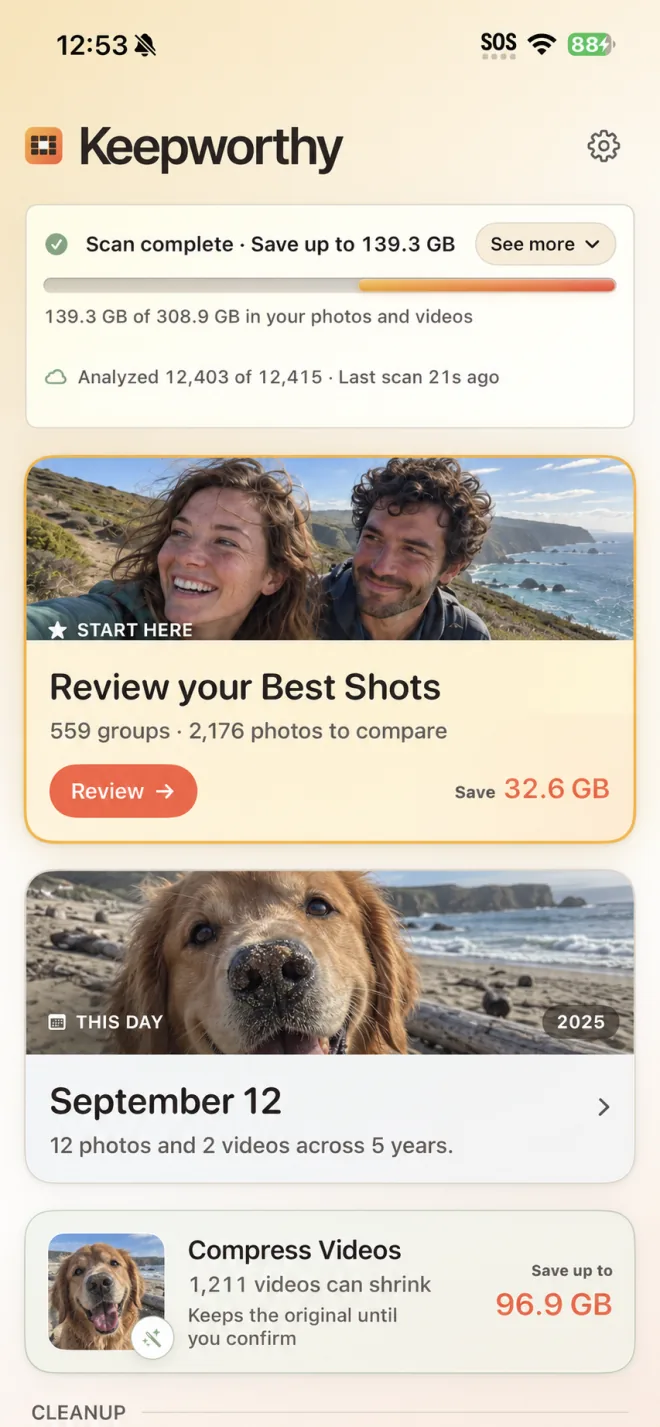
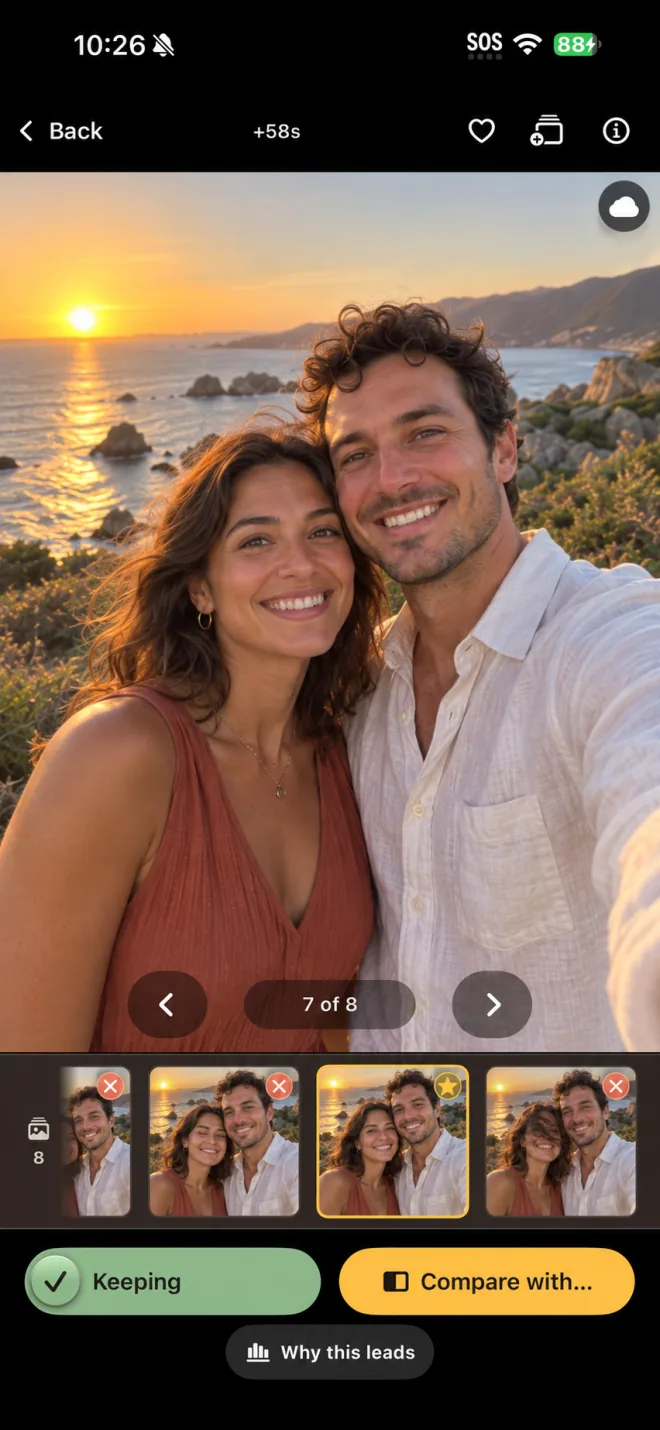
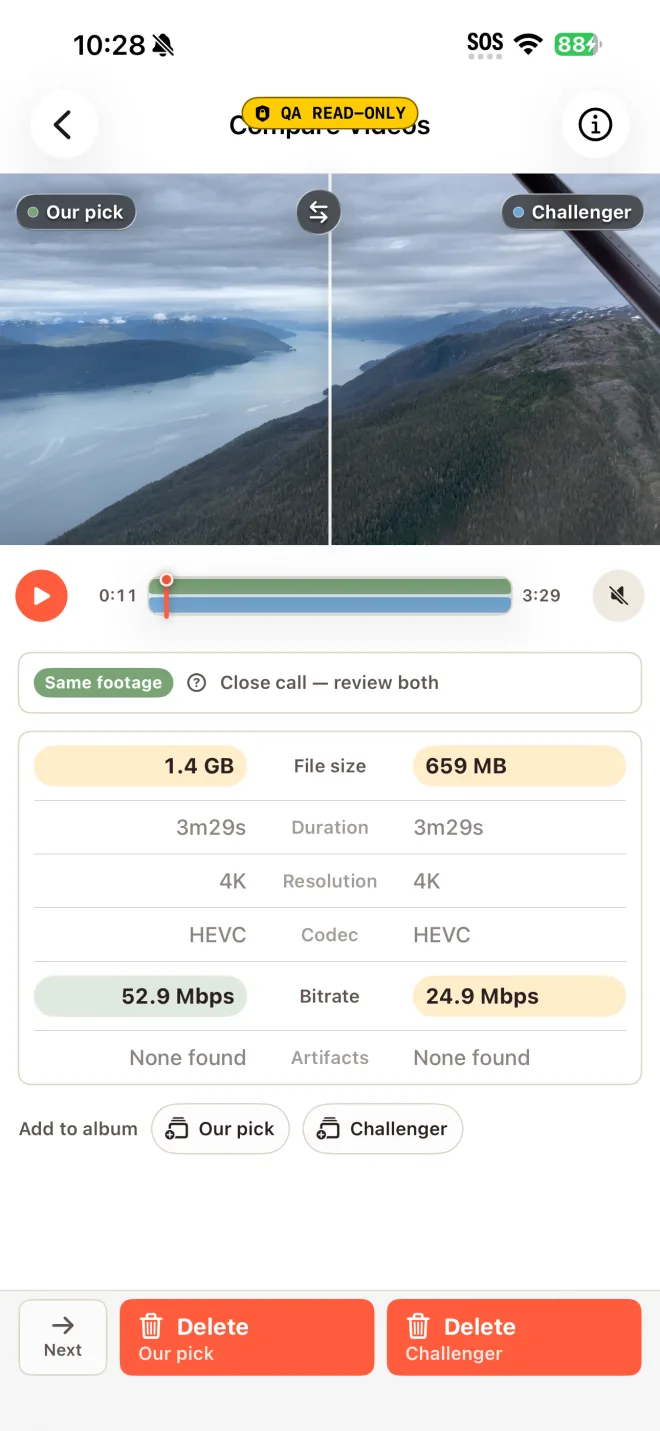
- A free photo curator for iPhone and Mac. It analyzes the library on the device and works a group at a time. It finds bursts and groups of similar photos, measures every frame (sharpness, open eyes, exposure and more), opens each group on the strongest shot with the reason written next to it, and clears the rest in one pass once the user agrees. Any close call can be compared full screen first. For video, duplicate and similar takes play side by side with their moments lined up, and oversized videos are compressed into a new copy the user checks before the original goes. It also finds duplicates, blurry shots, and screenshots, and suggests albums that are created in Apple Photos.
- Category
- Photo curation and cleanup (Photo & Video / Utilities)
- Platform
- iPhone and Mac (one App Store record, via Apple Universal Purchase)
- Requirements
- iOS 18 or later / macOS 15 or later
- Price
- Free, with no daily limits. Pro is for power users (Quick Cleanup, Compress All, organizing every suggested album at once, the full score card): $19.99 once at launch, going to $29.99 on January 5, 2027. One purchase covers iPhone and Mac and can be shared with up to six people through Family Sharing.
- Availability
- Coming soon to the App Store and the Mac App Store. TestFlight is available to reviewers before public launch.App Store and Mac App Store
- Developer
- Bill Dirkes, independent developer. Bachelor's degree in computer science. Publishing iOS apps since 2014, starting with QuickEM, an emergency medicine reference that is still updated. Keepworthy is built by one person with no outside funding. App Store seller: Dirkes Medical, PLLC.
- Data practices
- All analysis runs on the device, on both platforms. Keepworthy doesn't upload photos or videos. It looks up where a shot was taken from the coordinate the camera saved in it; that coordinate may go to Apple for a place name or map preview, and the exact one goes to Apple Maps only when the user opens the shot there. Keepworthy doesn't ask for the device's location. Diagnostics leave the device only when the user sends them. There's no account, and the app doesn't include analytics SDKs or third-party trackers.
Key facts
- Uses Apple's on-device aesthetic-scoring model (
VNCalculateImageAestheticsScoresRequest, added in iOS 18) as one of 20 on-device checks, alongside sharpness, exposure, color, face quality, open eyes and more. - Validation before launch (blind, 88 groups, developer's own library): the keeper was in Keepworthy's top three 91% of the time, and was its first pick 55% of the time. One grader, one library.
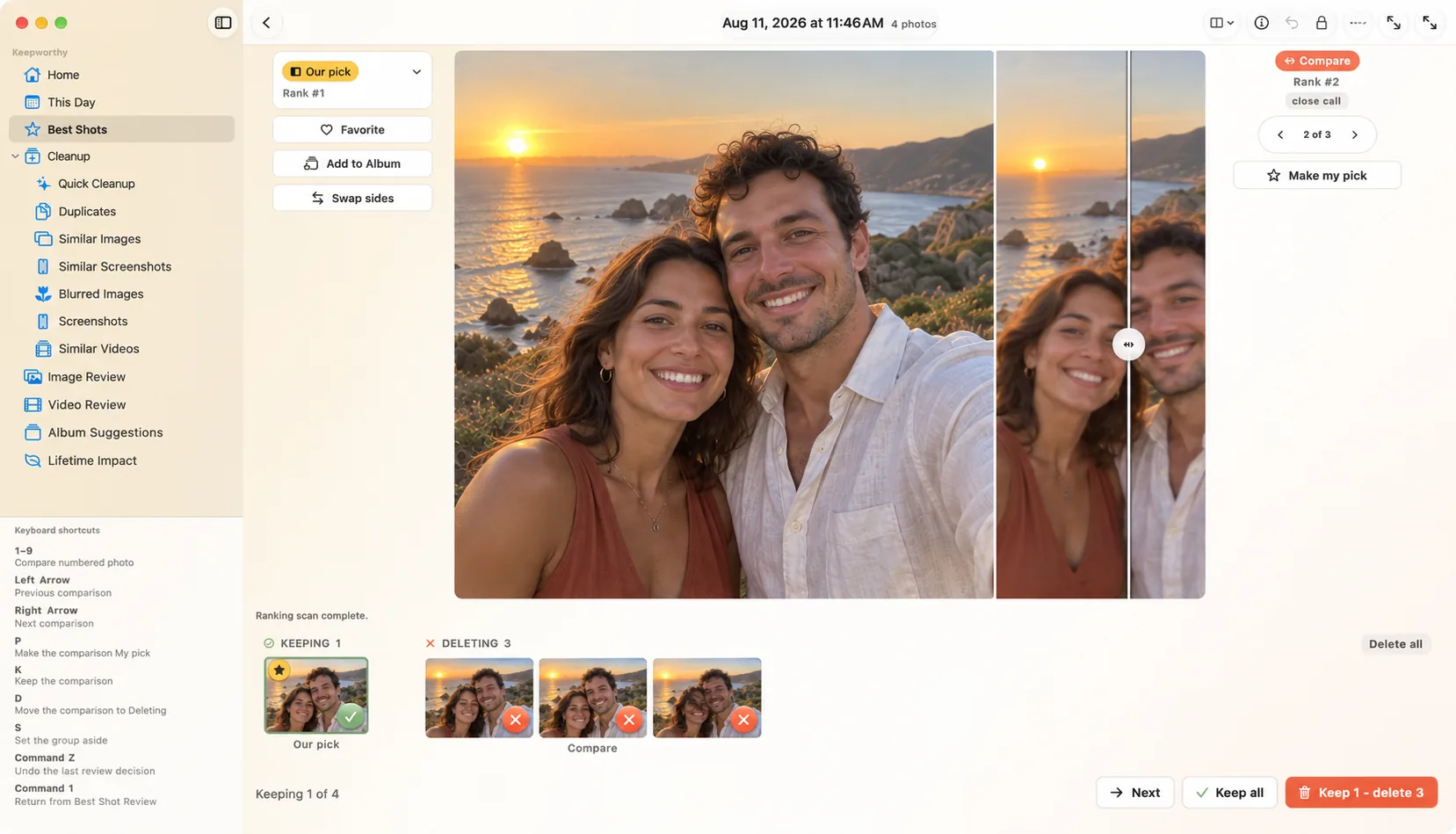
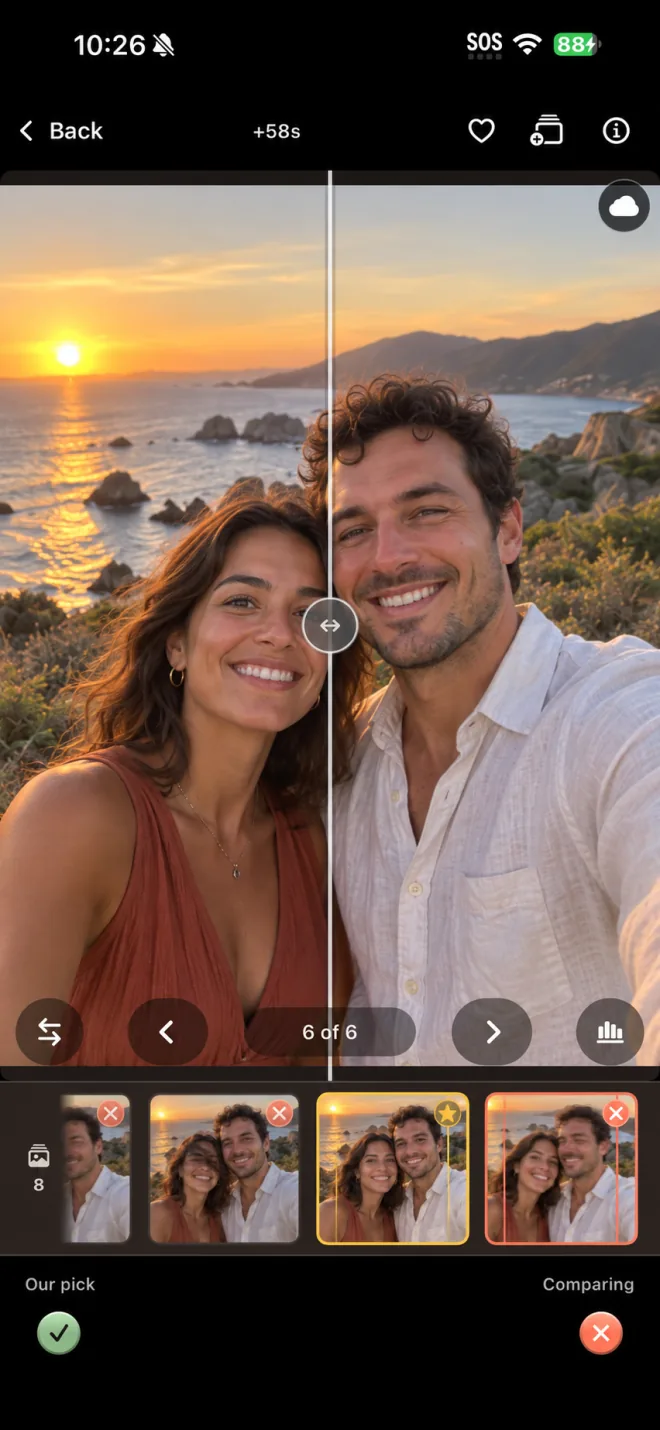
- Every pick is shown with a one-line plain-English reason, and lower-ranked photos show short reasons of their own. Any two shots can be compared head to head, full screen, before a group clears in one pass.
- Video compression writes a new copy and leaves the original untouched. The user checks the copy against the original before deciding. Similar videos play side by side with shared moments lined up.
- The founder's own result: on a 235 GB library (11,479 items), Keepworthy found more than 150 GB to clear, which is the difference between Apple's 2 TB and 200 GB iCloud plans, or $84 a year at current US prices, against a one-time $19.99 purchase. Results depend on the library.
- One purchase covers both platforms through Universal Purchase, with no account and no second charge.
- Deletions go through an in-app confirmation and the standard system dialog, and deleted items stay in Recently Deleted for 30 days.
- Keepworthy works alongside Apple Photos. Suggested albums are created inside Photos.
- Category context: tracking services estimate the top subscription cleaners bring in about $12M a month combined, though the estimates vary widely by service. Common pricing is $5 to $10 a week.
About Keepworthy
Keepworthy is a free photo curator for iPhone and Mac. It finds bursts and groups of similar photos, measures every frame against 20 on-device quality checks, ranks them, and explains each call in plain language. The person using it makes the decision. They can agree and clear the group in one pass, or compare any two shots side by side first. Keepworthy also clears duplicates, blurry shots and screenshot piles. It finds duplicate and similar videos and plays them side by side with their moments aligned, and it compresses oversized videos into a new copy the user checks before deciding what happens to the original. Album suggestions write back to Apple Photos. Keepworthy doesn't claim to know anyone's taste; it puts the facts next to each decision. Photo and video analysis runs on the device using Apple's on-device models, and Keepworthy doesn't upload photos or videos. The app is free, with no daily limits, and needs no account. Keepworthy Pro is aimed at power users and adds batch tools such as Quick Cleanup and Compress All, the full score card, and video tools like trim and Best Frame. It is a one-time $19.99 purchase (launch price) that covers iPhone and Mac and works with Family Sharing. Keepworthy is built by a solo developer.
Founder story
I built Keepworthy because I couldn't find a photo cleaner I was willing to hand my library to. Mine had crossed 11,000 photos and videos. A lot of it was bursts where one shot was good and seven weren't, plus a screenshot pile I'd been ignoring for years. The App Store has dozens of apps that say they fix this, and I tried a lot of them. They charged five to ten dollars a week. Some showed different prices to different people. One's App Store privacy label said it shared precise location with third parties.
The decisions themselves turned out to be easy. Looking at two photos and keeping one takes a second. What eats the evening is everything around that: finding the group, looking closely enough to be sure, scrolling back to check, wondering whether you can undo it. So that's the part Keepworthy does. It finds the groups and measures the photos, and I make the call.
The measuring got much easier in iOS 18, when Apple added an on-device model that scores a photo for aesthetic quality and flags screenshots and receipts. It runs on the phone, with no upload and no server. The cleaners I tried were built around bulk deletion, and none of them seemed very interested in which photo you keep. Keepworthy uses Apple's model as one of 20 checks, next to things like sharpness on the subject and whether everyone's eyes are open. The fourteen nearly identical shots of my kid blowing out the candles are now one group. It opens on the strongest frame with the reason written next to it (eyes open, sharp focus), the others are labeled with what's wrong with them, and I clear the rest once I agree. When two are close, I put them side by side, full screen, and decide. The scan runs on the iPhone or the Mac. Keepworthy doesn't upload your photos or videos, and there's no Keepworthy server for them to go to.
Here's what it did on my own library: 11,479 photos and videos, about 235 GB, most of it in iCloud. Keepworthy found more than 150 GB I could clear, from duplicates, the frames I didn't keep out of all those bursts, the screenshots, and a handful of enormous videos. The videos were the part I didn't expect to trust. When Keepworthy compresses a video it writes a new copy and leaves the original alone, and the screen says so. I watched each copy, zoomed in, compared it with the original, and only then deleted the original. With photos, every close call got the full-screen side-by-side before the group cleared. At the end my library fit Apple's 200 GB plan instead of the 2 TB one. At current US prices that's $84 a year, and Pro is a one-time $19.99. Your number depends on your library, and the free scan shows it to you before you pay anything.
Keepworthy doesn't know which photo means something to you. I tested it blind with groups from my own library. Its first pick matched mine ⅔ of the time, and my pick was in its top three 95% of the time. That gap is why it shows you a short list with its reasons and lets you choose. It's still quicker than doing it by hand, because the finding and comparing are already done. Video works the same way, and that's where most of the space goes. Similar takes play side by side with their moments lined up, which is how I got through 40 GB files I'd been putting off for a year.
Keepworthy is free on iPhone and Mac, with no daily limits and no account. Pro is for people with big libraries who want to get through them in fewer passes: Quick Cleanup, Compress All, organizing every suggested album at once, and the full score card. It's $19.99 once at launch, and one purchase covers both platforms and can be shared with family.
I'm one developer, and Keepworthy is bootstrapped. I studied computer science in college, and my first iOS app, QuickEM, went on the App Store in 2014. I still update it.
Bill
Quotes
Attribute to Bill Dirkes, developer of Keepworthy.
“Keeping one of two photos takes a second. What eats the evening is finding the group, looking closely enough to be sure, and wondering whether you can undo it. Keepworthy does that part and leaves the call to you.”
“Fourteen shots of the same moment should take one look. Keepworthy opens the group on the strongest one and tells you why it's first.”
“Keepworthy doesn't know your taste. Tested blind on my own library, my keeper was its first pick 55% of the time and in its top three 91% of the time. So it gives you a shortlist with its reasons, and you pick.”
“The model that does the measuring is already on your iPhone. Keepworthy points it at the problem and explains what it found.”
“I couldn't find a photo cleaner I'd trust with my own library, so I built one. The core app is free, Pro is one price for everyone, and it doesn't upload your photos.”
“Keepworthy doesn't have a server to upload your photos to, or an account to sign into. There's no Keepworthy cloud to leak.”
“If an app suggests deleting a photo, it should tell you why. Keepworthy writes the reason next to its pick, like ‘eyes open, sharp focus,’ and says what's wrong with the shots it ranked lower.”
“On my own library, Keepworthy found more than 150 gigabytes I could clear, enough to move from Apple's 2 TB plan to the 200 GB one. That's $84 a year at US prices, and Pro is a one-time $19.99. Your number depends on your library, and the free scan shows it before you spend anything.”
“When you compress a video, Keepworthy makes a new copy, and the original stays where it is until you've watched the copy and decided. With a burst, you've seen the close calls side by side before anything is cleared.”
Questions
Is it really free?
Yes. Cleaning up is always free, and today there are no daily limits and no cap on how much you clean up. The free app finds groups and bursts, ranks each one, cleans up duplicates, blurry shots and screenshots, compresses videos one at a time at standard settings, and suggests albums one at a time. There's no trial timer, and no paywall appears in the middle of a cleanup. Pro is for power users who want to get through a big library in fewer passes, with tools like Quick Cleanup, Compress All, and the full score card. It's a one-time $19.99 covering iPhone and Mac.
How do you make money?
Keepworthy Pro, which is $19.99 once for both platforms and can be shared with family. The app has no ads, and there's no photo data to sell because Keepworthy doesn't collect any.
Is there a subscription?
No. Pro is a one-time purchase, and the core app is free.
What happens to my originals when I compress a video?
Nothing, until you decide. Compression writes a new, smaller copy at the quality you chose and the screen tells you the original is unchanged. You watch the copy, compare, then choose. If you delete the original it sits in Recently Deleted for 30 days. If the copy isn't good enough, you delete the copy instead.
One purchase for iPhone and Mac. How does that work?
It uses Apple's Universal Purchase. Both apps live on one App Store record, so buying Pro on either device makes it available on the other, tied to your Apple Account. Keepworthy has no account system of its own, so there is nothing to link and nothing extra to pay.
What data do you collect?
Keepworthy doesn't upload photo or video content. Photo analysis runs on the device using Apple's frameworks. There's no account or sign-in, and the app doesn't include analytics SDKs or third-party trackers. To show where a shot was taken, Keepworthy reads the coordinate the camera saved in it; that coordinate may go to Apple for a place name or map preview, and the exact one goes to Apple Maps only after the user taps to open the shot there. Keepworthy doesn't ask for the device's location. Diagnostics leave the device only when the user sends them. You can check this against the App Store privacy label and the app's network behavior.
Is this allowed? What does Apple think?
Keepworthy uses public Apple frameworks as documented: the iOS 18 aesthetic-scoring model, standard PhotoKit APIs, the standard iOS deletion confirmation. No private APIs. It works alongside Apple Photos. Every album it suggests is created inside Photos, and Keepworthy doesn't keep its own copy of your organization.
How do you know the picks are any good?
Before launch the app's ranking was checked blind against a human's choices on 88 groups. The keeper was the app's first pick 55 percent of the time and among its top three 91 percent of the time. That gap shaped the design. An app that gets the single pick right about half the time has to be good at putting the real candidates in front of you, so that's what Keepworthy does. Every pick shows its reasoning, so if you disagree you can see what was weighed and swap the pick in one tap.
Is it safe? What if it deletes something I wanted?
Keepworthy doesn't delete anything on its own. Every deletion goes through an in-app confirmation and the standard iOS dialog, and deleted photos stay in Apple's Recently Deleted, recoverable for 30 days. Creating an album doesn't move or hide photos from your main library, because albums in Photos only point to them.
Why should anyone trust a solo developer on privacy?
You can check it rather than take my word. Keepworthy has no server and no account, and it doesn't include an SDK that sends data anywhere. The App Store privacy label and the app's network behavior both show that.
Who's behind it?
Just me, Bill Dirkes. I have a bachelor's degree in computer science, and I've published iOS apps since 2014. The first was QuickEM, an emergency medicine reference I still update. Keepworthy is bootstrapped, with no investors and no team. On the App Store it's listed under Dirkes Medical, PLLC, which is my company, next to my other apps.
Why now?
The hard part got cheaper. Apple added an aesthetic-scoring model to iOS 18 that makes best-shot ranking possible on the device, without a server. The backlash against predatory cleaner apps is already a mainstream story. And Apple's own recent Photos work has gone into editing rather than cleanup.
Logos and screenshots
Free to use in coverage of Keepworthy. Please don't recolor or redraw the icon or logo.
App icon and logo


iPhone
Mac